Index
In today’s world where enormous amounts of data are generated every day, especially in supercomputing datacenters, managing and querying metadata at scale is a significant challenge. Additionally, accessing internal metadata of the BeeGFS parallel filesystem requires custom mechanisms.
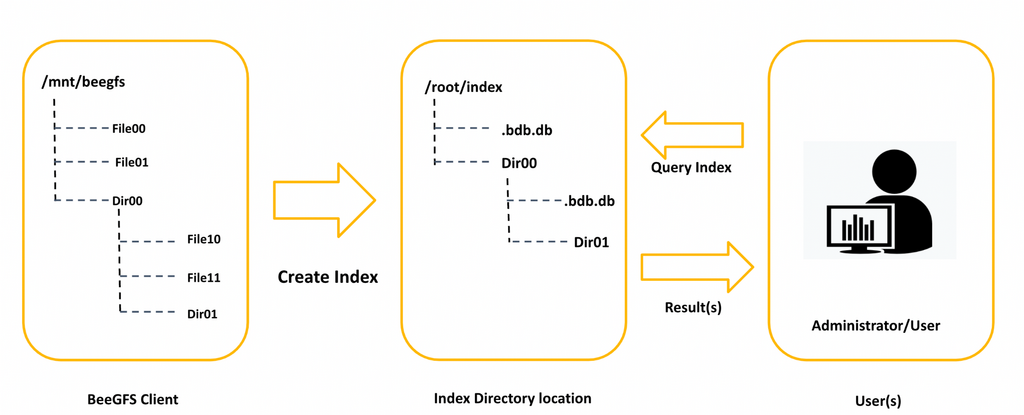
BeeGFS Index addresses these challenges by creating a hierarchical metadata index that extracts filesystem metadata along with BeeGFS-specific attributes and stores them efficiently in a local database. It provides a simple, high-performance interface to query detailed metadata, including file names, timestamps (access, modification, creation), permissions, file size, extended attributes, and BeeGFS-specific information like stripe pattern, storage targets, and owner metadata node ID, all without affecting general filesystem operations.
Starting with BeeGFS v8.4, the index has been upgraded to build on the latest
GUFI (Grand Unified File Index,
released by LANL) release, with a BeeGFS metadata extraction plugin that captures
the filesystem-specific attributes. The command-line interface is largely
unchanged from earlier releases, but indexes created with v8.3 or older use
the legacy .bdm.db schema and are not readable by the v8.4 beegfs
index commands; they must be refreshed once after upgrade. See
beegfs index migrate for the recommended path.
Since filesystems are continuously updated with ongoing operations, the index must be updated to reflect the latest changes. Users can rescan a specific subdirectory manually to update its metadata or perform a recursive rescan to update the entire directory tree, ensuring that the index stays in sync with the filesystem.
Description
BeeGFS Index enables users to efficiently search through billions of files and directories while minimizing the impact on filesystem performance. Its multithreaded design allows parallel scanning of multiple directories, ensuring fast and efficient metadata extraction. The index supports POSIX user permissions, directory tree attributes, and hierarchical representation.
By default, BeeGFS Index extracts BeeGFS-specific metadata for regular files
using the BeeGFS metadata extraction plugin. The plugin reads internal BeeGFS
attributes (entry IDs, stripe pattern, storage targets, owner metadata node,
RST bindings) using BeeGFS ioctls and stores them in dedicated plugin tables.
However, these additional ioctls can increase the filesystem load during index
creation. To mitigate this, users have the option to disable BeeGFS-specific
metadata extraction with the --no-beegfs-metadata (-B) flag of
beegfs index create.
Only the root user can create the index, as the process requires scanning the entire directory hierarchy, which may include files and directories owned by different users. Therefore, it is recommended that an administrator perform the index creation. Maintaining a single index directory per BeeGFS filesystem helps ensure consistency with ongoing filesystem changes.
Since the index preserves user permissions, it can be shared among users and administrators. Even with a shared index, users can query only their own data, ensuring access control.
BeeGFS Index supports three indexing methods:
In-Tree Index — stored within the BeeGFS filesystem.
Out-Of-Tree Index — stored at a different location, such as another local filesystem.
Remote Index — stored and managed on a separate index host; index operations are delegated to it over SSH.
Warning
Creating an index or rescanning directories to update the index should not run in parallel across multiple instances, as this can cause database corruption or an inconsistent index state.
In-Tree index
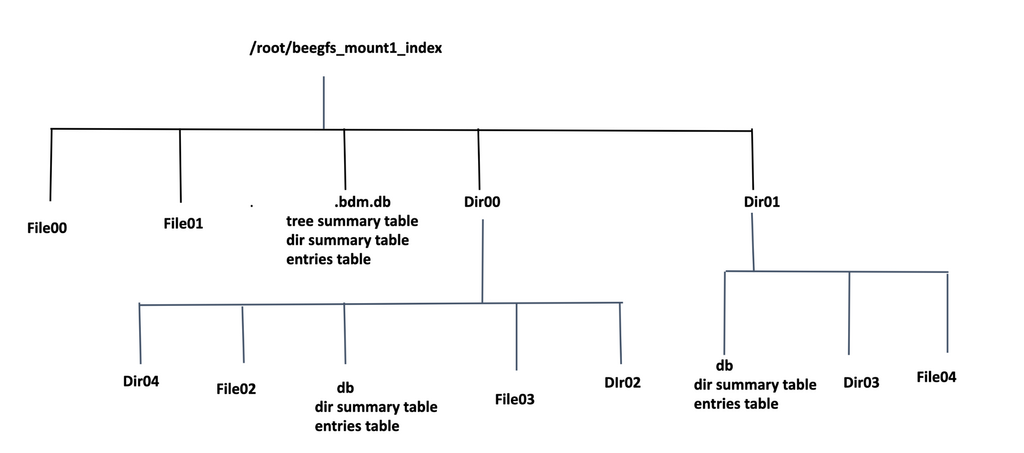
In the In-Tree Index method, the index is created directly inside the BeeGFS filesystem.
Each subdirectory will contain a separate db.db database file, which holds metadata
specific to that subdirectory. The database stores detailed metadata information about
the files within the directory, such as filenames, timestamps, file size, extended
attributes, and more.
However, creating the index inside BeeGFS can potentially interfere with ongoing filesystem operations, especially during high-traffic periods. To minimize the impact, it is recommended to schedule metadata scanning during periods of low filesystem activity if the index needs to reside within the BeeGFS filesystem.
Out-Of-Tree Index
The Out-Of-Tree Index method allows users to create the BeeGFS filesystem index at an external location, such as a local filesystem or an NFS share.
During the index creation process, a directory hierarchy is generated at the chosen index location, mirroring the structure of the source directory. Each directory in the index stores metadata information about its files and subdirectories. The index hierarchy preserves the user permissions of the source directory, enabling faster metadata queries while maintaining access control.
In BeeGFS, metadata can be distributed across multiple metadata nodes. With the Out-Of-Tree Index, metadata is stored locally, making queries significantly faster without affecting critical filesystem operations.

Remote Indexing
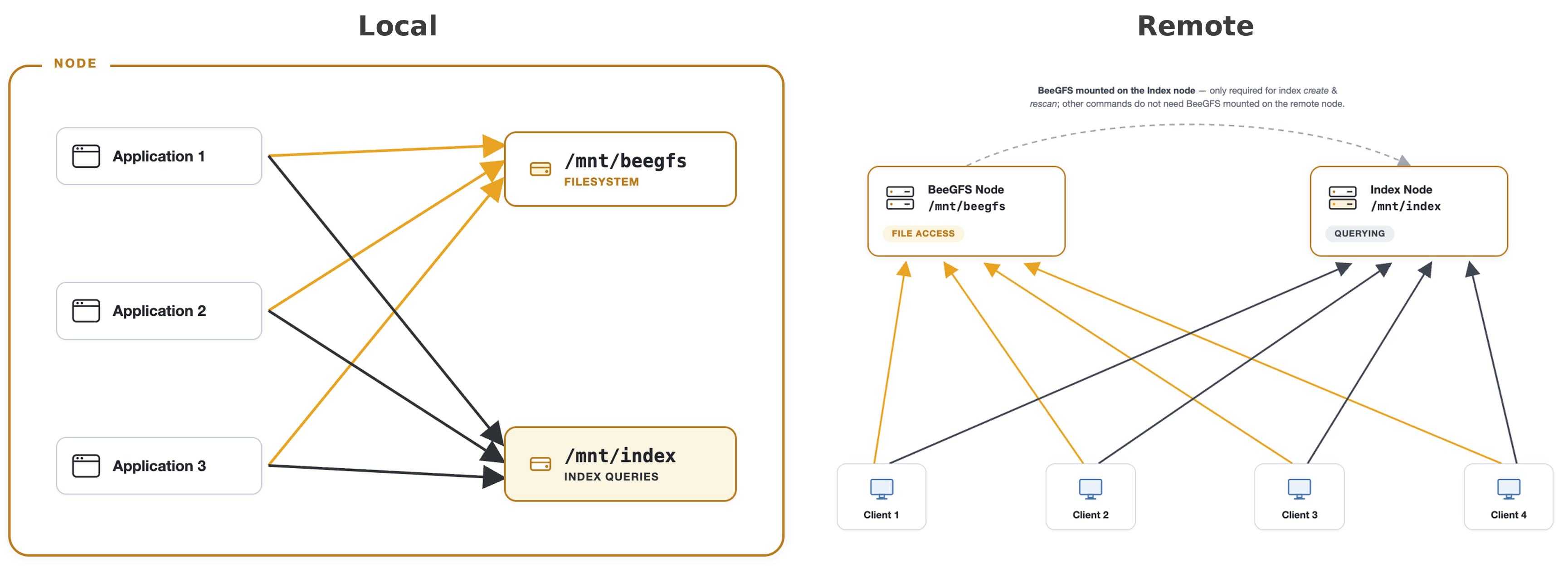
Indexed metadata can be stored on a dedicated server with sufficient storage capacity rather than on the same compute node where the BeeGFS filesystem is mounted and user applications are running. With a remote index, all the load generated by index queries or index creation is isolated from BeeGFS filesystem activities.
With In-Tree and Out-Of-Tree indexing, the index is created and queried on the same host that has the BeeGFS filesystem mounted, so the indexing work shares that host’s CPU, memory, and disk. Remote indexing instead hands the index operations — create, rescan, and query — to a separate index host. The compute node accessing the index only needs to connect over the network to the remote server storing the index; the index databases live on, and the work runs on, the remote machine.
This is useful when a global index is created for the BeeGFS filesystem and shared by multiple users, when the index should sit on dedicated hardware, or to keep the workload of indexing operations separate from high-priority user applications.
The current implementation supports SSH as the transport; additional
transports may be added in future releases. To enable remote indexing, either
set addr = "ssh:<host>" in the .beegfs.index entry
(see Initial configuration) or pass --index-addr ssh:<host> on the
command line.
The remote host must have the beegfs-index package installed and be
reachable via SSH from the client. The index directory must be writable on the
remote host. SSH must be configured for key-based (passwordless) authentication
from the client to the index host: beegfs index runs SSH in batch mode and
will not prompt for a password, so a missing or password-only credential makes
the command fail immediately rather than hang.
The index stores the same UIDs, GIDs, and directory permissions as the source
filesystem, and the kernel uses them to control access when beegfs index
runs. Make sure each user has the same UID and GID on the index host as on the
clients. If they do not match, a user may be denied access to their own data
or shown another user’s.
While beegfs index create and beegfs index rescan run, the index host
must have the BeeGFS filesystem mounted at the source path — the index walk
reads the filesystem directly and issues BeeGFS ioctls on the index host. Once
the index has been built, the filesystem can be unmounted on the index host;
queries (find, ls, stat, query) read only the index databases,
so the index can be served to other compute nodes without a local BeeGFS
mount.
Local (In-Tree vs Out-Of-Tree) vs Remote Indexing
In-Tree and Out-Of-Tree are both local indexing methods — the index work runs on the host where BeeGFS is mounted, and they differ only in where the index databases are stored. Remote indexing instead changes where the work runs.
Local Indexing (In-Tree or Out-Of-Tree):
Pros: Simple setup — no extra host and no SSH configuration required; index data stays directly accessible on the node where BeeGFS is mounted.
Cons: Index creation and queries consume CPU, memory, and disk I/O on the compute node that has BeeGFS mounted.
Remote Indexing:
Pros: Index creation and query load is fully isolated from the BeeGFS filesystem and the compute nodes; a single index host can serve many BeeGFS clients.
Cons: Requires a dedicated index host with its own storage and key-based SSH access from each client.
The two local methods differ only in where the index databases are stored:
In-Tree Index:
Pros: No additional storage needed as index database files are stored inside the BeeGFS file system itself.
Cons: Indexing operations may impact filesystem performance, especially during high traffic periods.
Out-Of-Tree Index:
Pros: As index databases are stored outside the file system, running queries on the indexed data will not affect the on-going important file system operations.
Cons: Requires dedicated storage space to store the indexed metadata of the file system.
Index Database
Each indexed directory contains a single SQLite database file named
db.db. The database is composed of a set of core tables that mirror the
structure of the directory, a set of BeeGFS plugin tables that hold the
filesystem-specific attributes, and a set of views that join the two for
convenient querying.
Core tables (one db.db per directory)
entriesOne row per regular file or symbolic link in this directory. Holds the POSIX metadata that
stat(2)would return:name,type(ffor file,lfor symlink),inode,mode,uid,gid,size,blksize,blocks,atime,mtime,ctime,crtime,nlink,linkname(symlink target), and extended attributes (xattrs).This is the table that
beegfs index find,beegfs index ls, andbeegfs index statread from.summaryA single row describing the directory itself plus per-directory aggregates: total file count, total link count, minimum and maximum file size, minimum and maximum timestamps, total extended-attribute count, directory depth, and the directory’s own
mode/uid/gid. Aggregate stats such asfilecount,filesize, anddircountare answered from this table.treesummary(root of the index only)A recursive aggregate covering the full subtree under the index root. Populated automatically after
beegfs index createand refreshed bybeegfs index rescan(unless--skip-treesummaryis passed). This table backsbeegfs index infoand the globaltotal-*stats.
BeeGFS plugin tables
The following tables are populated by the BeeGFS metadata extraction plugin
during index creation and rescan. They are skipped when --no-beegfs-metadata
(-B) is given to beegfs index create.
beegfs_entriesOne row per regular file with the BeeGFS-specific identifiers and striping configuration:
entry_id,parent_entry_id,owner_id(metadata server that owns the file),stripe_pattern_type,stripe_chunk_size,stripe_num_targets,storage_pool_id,feature_flags,path_info_flags,orig_parent_uid,orig_parent_entry_id,file_data_state, and the Remote Storage Target (RST) fields (rst_major_version,rst_minor_version,rst_cool_down_period,rst_file_policies,num_rst_ids).beegfs_stripe_targetsOne row per (file, stripe target) pair, listing the storage targets or buddy groups across which the file’s data is striped.
beegfs_rst_targetsOne row per (file, RST id) pair, recording the Remote Storage Target bindings configured for the file.
Views
Views are pre-built combinations of the tables above. They let you read the information you usually want in one place, without writing the join logic yourself.
pentriesandvrpentriesJoined views of
entrieswith directory-path information. Use these inbeegfs index query -E "..."to retrieve entry-level rows with the full path available viarpath().vrsummaryPath-rolled view over
summaryfor directory-level queries.beegfs_file_viewA file-only view over
beegfs_entriesthat exposes all of its columns for regular files, adds a human-readablestripe_pattern_namecolumn (RAID0,RAID10,BUDDYMIRROR), and includes the Remote Storage Target fields (rst_major_version,rst_minor_version,rst_cool_down_period,rst_file_policies,num_rst_ids).beegfs_file_targets_viewA view that joins
beegfs_entrieswithbeegfs_stripe_targetsfor easy per-target listings.
Note
.bdm.db databases created with BeeGFS v8.3 or older use a different
schema and are not readable by the v8.4 beegfs index commands. See
Initial configuration to either rescan or migrate existing indexes.
Step-By-Step Guide for Index
Prerequisites
The following packages need to be installed on the node that runs BeeGFS Index:
coreutils
SQLite
python3
Note
For remote indexing over SSH, also install openssh-client and set up
key-based SSH access to the index host.
Installation
Visit the BeeGFS download page and follow the
step-by-step directions to add the BeeGFS package repositories to your Linux distribution’s
package manager.
Using your distribution’s package manage install the beegfs-index package.
Initial configuration
For most deployments it is recommended to create a .beegfs.index file at
the root of the BeeGFS mount point so that the beegfs index commands
auto-discover their index location. Alternatively, the location can be supplied
on each command with --fs-path, --index-root, and --index-addr
(beegfs index create reads the filesystem path from --fs-path, or from
the .beegfs.index path when that flag is omitted).
The beegfs-index package installs an example configuration at
/etc/beegfs/index/beegfs.index.example, which can be copied to the BeeGFS
mount root as .beegfs.index and edited to match your deployment.
The .beegfs.index file is a TOML document with a single [index] entry
that maps the BeeGFS filesystem to its corresponding index location.
A typical .beegfs.index file kept at /mnt/beegfs/.beegfs.index looks
like this:
# Index the entire filesystem locally on the same host.
[index]
path = "/mnt/beegfs"
root = "/mnt/index"
addr = "local"
threads = 8
For a deployment that delegates indexing to a remote host:
[index]
path = "/mnt/beegfs"
root = "/mnt/index"
# addr accepts a hostname or an IP address (e.g. "ssh:192.168.1.100")
addr = "ssh:indexserver.cluster.local"
threads = 8
The [index] entry’s fields:
pathAbsolute filesystem path being indexed: the BeeGFS mount point (e.g.
/mnt/beegfs). It is the default--fs-pathforbeegfs index createwhen that flag is omitted.rootFilesystem path where the index tree lives. For an In-Tree index, point this at the BeeGFS filesystem directory being indexed (the mount root or a subdirectory). For an Out-Of-Tree index, use any writable location (local filesystem or NFS share).
addrExecution target. Either
local(default) orssh:<host>to execute index operations on a remote host.threads(optional)Number of Gworker threads to use for indexing. When omitted it defaults to the global
--num-workersvalue (the local CPU count) for alocalindex, and to a single thread for anssh:.
Index Utilities
All BeeGFS Index operations can be performed through a beegfs tool using
beegfs index.
Operations like creating an index, rescanning the index, listing the files from the
index and finding files from the index are the subcommands to beegfs index.
beegfs index create
A new index is created with beegfs index create. The command traverses
the source directory and writes one db.db per directory under the index
root. The index can be stored In-Tree (inside the BeeGFS filesystem) or
Out-Of-Tree (any other writable path — local disk or NFS share). Independently
of where it is stored, the work can run locally or be delegated to a remote
index host (see the Remote Indexing section).
Flags:
-F,--fs-path— source filesystem path to index. Required unless apathis set in.beegfs.index(see Initial configuration).
--index-root— destination root for the index. When omitted, the root is read from the.beegfs.indexfile at the BeeGFS mount root (see Initial configuration), falling back to/mnt/index.
Common optional flags:
-x,--xattrs— include extended attributes.
-B,--no-beegfs-metadata— skip the BeeGFS metadata extraction plugin. Useful when extracting plugin attributes is too costly during a first pass.
--skip-treesummary— do not run the tree summary aggregation after indexing. The treesummary table backsbeegfs index infoand globaltotal-*stats, so most users should leave it enabled.
The number of indexing threads is taken from the threads field of the
.beegfs.index entry when set. Otherwise it follows the global
--num-workers flag (default: the local CPU count) for a local index, and
defaults to a single thread for a remote index.
The index is created at <index-root>/<basename(fs-path)>. For example,
--fs-path /mnt/beegfs --index-root /mnt/index produces the index at
/mnt/index/beegfs.
See beegfs index create --help for all available options.
Warning
Do not run multiple beegfs index create or beegfs index rescan
instances against the same filesystem in parallel; concurrent writers can
corrupt the database files or leave the index in an inconsistent state.
Creating an In-Tree index
To store the index inside the BeeGFS filesystem itself, pass the same path
for both --fs-path and --index-root:
$ beegfs index create -F /mnt/beegfs/prefix --index-root /mnt/beegfs/prefix
To control thread count and include extended attributes:
$ beegfs index create -F /mnt/beegfs/prefix --index-root /mnt/beegfs/prefix --num-workers 8 -x
Creating an Out-Of-Tree Index
To store the index outside the BeeGFS filesystem, pass a different path
for --index-root:
$ beegfs index create -F /mnt/beegfs/prefix --index-root /mnt/index
Creating GUFI tree /mnt/index/beegfs/prefix with 4 threads
Total Dirs:          6
Total Non-Dirs:      16
Time Spent Indexing: 0.01s
The other create variants print the same summary. To skip the BeeGFS
plugin during creation (BeeGFS-specific columns will be empty until a
follow-up rescan):
$ beegfs index create -F /mnt/beegfs/prefix --index-root /mnt/index --no-beegfs-metadata
beegfs index rescan
The index can be updated manually using the rescan functionality, which refreshes the metadata for a specific subdirectory in a previously indexed filesystem.
If users know which directories have changed over time, they can rescan only those specific directories to update the index. Alternatively, a periodic rescan of the entire directory tree can be scheduled to keep the index up to date. Running rescans during low-traffic periods is recommended to minimize the impact on important filesystem operations.
The rescan command ensures that:
Newly created files and directories are added to the index.
Deleted files and directories are removed from the index.
BeeGFS specific metadata are re-read from the filesystem and refreshed.
Modes of Rescan:
Rescan (non-recursive, default)
Updates metadata for the specified directory only.
Indexes newly created files within that directory.
Detects and indexes newly created immediate child subdirectories.
Deletes stale immediate child subdirectories from the index.
Does not update existing child subdirectories that were already indexed.
Rescan with recursion (--recurse)
Recursively updates the index for the entire subdirectory tree.
Updates metadata for all files and subdirectories, including existing indexed subdirectories.
Detects and indexes newly created files and directories at all levels.
Removes stale directories and files from the index.
Multiple directories may be passed in a single invocation; each is resolved independently against the configured index root, so paths from unrelated parts of the tree can be refreshed together.
See beegfs index rescan --help for all available options.
Rescan a single subdirectory (non-recursive):
$ beegfs index rescan /mnt/beegfs/prefix/directory
Creating GUFI tree /mnt/index/beegfs/prefix with 4 threads
Total Dirs:          1
Total Non-Dirs:      3
Time Spent Indexing: 0.00s
Rescan a subdirectory recursively:
$ beegfs index rescan --recurse /mnt/beegfs/prefix/leaf_directory
Creating GUFI tree /mnt/index/beegfs/prefix with 4 threads
Total Dirs:          1
Total Non-Dirs:      2
Time Spent Indexing: 0.00s
Rescan multiple unrelated subdirectories in one invocation (each prints its own summary):
$ beegfs index rescan /mnt/beegfs/prefix/directory /mnt/beegfs/prefix/leaf_directory
Creating GUFI tree /mnt/index/beegfs/prefix with 4 threads
Total Dirs:          1
Total Non-Dirs:      3
Time Spent Indexing: 0.01s
Creating GUFI tree /mnt/index/beegfs/prefix with 4 threads
Total Dirs:          1
Total Non-Dirs:      2
Time Spent Indexing: 0.00s
Warning
Avoid running multiple rescan instances for the subdirectories in parallel to prevent data inconsistency or database corruption.
beegfs index migrate
Indexes created with BeeGFS v8.3 or older use a different database schema
than the one introduced in v8.4. The v8.4 beegfs index commands cannot
open the legacy .bdm.db files directly, so an existing index must be
refreshed once after upgrading.
Warning
v8.4 beegfs index commands cannot read pre-v8.4 .bdm.db indexes.
Pick one of the two approaches below before running any other index
operation against an upgraded deployment.
Recommended: full rescan
The simplest and most complete path is to discard the legacy databases and rebuild the index using the current BeeGFS metadata extraction plugin:
$ beegfs index rescan --recurse /mnt/beegfs
A full --recurse rescan repopulates every directory’s db.db with the
v8.4 schema, including all new BeeGFS plugin fields. This is the recommended
path because it guarantees the index contains complete information.
Fallback: in-place migration
When a full rescan is too costly (very large indexes, limited maintenance
windows), the migrate subcommand can convert legacy .bdm.db files
into the v8.4 schema in place without re-walking the filesystem:
$ beegfs index migrate --index-root /mnt/index
Migration complete.
  Total databases found: 7
  Migrated (full):       7
  Migrated (simple):     0
  Skipped:               0
  Failed:                0

Rebuilding tree summaries...
The command walks the index tree starting at --index-root, detects each
legacy database, and applies the appropriate schema conversion. Records that
existed in the old schema are preserved; however, the migration cannot
synthesize information that the old plugin did not capture. The following
columns will be left NULL for migrated rows until a subsequent rescan
repopulates them:
stripe_default_num_targets
storage_pool_id
path_info_flags
orig_parent_uid
orig_parent_entry_id
file_data_stateAll Remote Storage Target (RST) columns
Useful flags:
--force— re-migrate even when a new-formatdb.dbalready exists. The existing file is backed up todb.db.bakbefore the conversion.
--skip-treesummary— skip rebuilding the tree summary table after migration. By default, the treesummary is dropped during migration and rebuilt automatically.
After a successful migrate, schedule a beegfs index rescan --recurse at
a later, more convenient time to populate the columns that were left NULL.
beegfs index info
The info subcommand displays the active index configuration and aggregate
statistics from the tree summary table. It is useful both for verifying that
a beegfs index invocation is targeting the expected index and for
inspecting top-level metadata aggregates without running a manual SQL query.
By default info shows the discovered index root, the execution target,
and a compact set of treesummary columns. Pass --raw to print exact byte
counts instead of human-readable sizes.
The tree summary is stored at the root of the index, so the aggregate columns
are filled when info is run against the index root. For a subdirectory —
or when the tree summary is not up to date, for example after a rescan started
with --skip-treesummary — pass --treesummary to compute it before
reading.
Example: show index info for the current directory.
$ beegfs index info
Example: show index info for a specific path.
$ beegfs index info /mnt/beegfs
INDEX_ROOT         INDEX_ADDR  LAST_UPDATED         TOTAL_FILES  TOTAL_DIRS  TOTAL_LINKS  TOTAL_SIZE  DEPTH
/mnt/index/beegfs  local       2026-06-02 01:40:21  18           6           2            1.0M        3
Example: print the same information as JSON.
$ beegfs index info --output json-pretty /mnt/beegfs
[
 {
  "depth": "3",
  "index_addr": "local",
  "index_root": "/mnt/index/beegfs",
  "last_updated": "2026-06-02 01:40:21",
  "total_dirs": "6",
  "total_files": "18",
  "total_links": "2",
  "total_size": "1.0M"
 }
]
beegfs index stats
The stats subcommand computes aggregate statistics over the index tree.
It accepts a statistic name and an optional path, and returns the value(s)
computed from the index databases without touching the BeeGFS filesystem.
Note
beegfs index stats can be run with the absolute path of a filesystem
directory or an index directory, or from inside one of those directories
with a relative path.
See beegfs index stats --help for all available options.
The supported statistic names are grouped below by output shape.
Global statistics (single number)
total-filecount— total number of regular files in the tree.
total-dircount— total number of directories.
total-filesize— total bytes used by regular files.
total-linkcount— total number of symbolic links.
total-leaf-files— total regular files in leaf directories.
total-leaf-links— total symbolic links in leaf directories.
Per-directory statistics (path, value)
filecount— regular file count per directory.
filesize— total file size per directory.
depth— depth of each directory.
linkcount— symbolic link count per directory.
dircount— immediate subdirectory count.
leaf-dirs— list of leaf directories (no value column).
leaf-depth— depth of each leaf directory.
leaf-files— regular file count in each leaf directory.
leaf-links— symbolic link count in each leaf directory.
Per-level statistics (level, count)
files-per-level— regular file count by depth level.
links-per-level— symbolic link count by depth level.
dirs-per-level— directory count by depth level.
Aggregate leaf statistics (single number)
average-leaf-files— average regular files per leaf directory.
average-leaf-links— average symlinks per leaf directory.
average-leaf-size— average total file size per leaf directory.
median-leaf-files— median regular files per leaf directory.
median-leaf-links— median symlinks per leaf directory.
median-leaf-size— median total file size per leaf directory.
Cross-directory statistics
duplicate-names— names that appear in more than one directory.
Per-file listings (id, size, path)
uid-size— all regular files listed by uid then size.
gid-size— all regular files listed by gid then size.
Histograms (bucket, count)
extensions— file-extension frequency histogram.
filesize-log2-bins— file-size histogram in base-2 buckets.
filesize-log1024-bins— file-size histogram in base-1024 buckets.
dirfilecount-log2-bins— per-directory file-count histogram, base 2.
dirfilecount-log1024-bins— per-directory file-count histogram, base 1024.
Age-bin statistics
Age-bin statistics report counts grouped by file age relative to a chosen reference time. Pass
--reftime <epoch>to control the reference point; if omitted, the current time is used.
Examples
Get the total number of regular files in the tree:
$ beegfs index stats total-filecount /mnt/beegfs/prefix
VALUE
14
Use -c (--cumulative) to report a single cumulative value:
$ beegfs index stats -c total-filecount /mnt/beegfs/prefix
VALUE
14
Show the number of files at each directory depth (level, count):
$ beegfs index stats files-per-level /mnt/beegfs/prefix
VALUE
0      7
1      6
2      1
Show file-size distribution in base-1024 buckets:
$ beegfs index stats filesize-log1024-bins /mnt/beegfs/prefix
VALUE
[0,1)                 2
[1,1024)              2
[1024,1048576)        2
[1048576,1073741824)  1
For all options check beegfs index stats --help.
beegfs index find
The find subcommand searches the index for files matching one or more
predicates. The flag set is modeled on GNU find(1), so most predicates
will look familiar. Because queries run against the local index databases
instead of walking the BeeGFS filesystem, beegfs index find is typically
much faster than running find against the mount directly.
By default only matching paths are printed, one per line, relative to the
search root (mirroring GNU find). Pass --absolute-paths to print
absolute BeeGFS filesystem paths instead, and -l to print a long listing
with metadata for each match.
Common predicates:
--name <pattern>/--iname <pattern>— match basename (glob,--inameis case-insensitive).
--path <pattern>— match the full path.
--regex <pattern>/--iregex <pattern>— match by regular expression.
--type d|f|l— match directory, file, or symbolic link.
--size +N/-N/N— match files larger / smaller / equal to the given size. Suffixes:c(bytes),k,M,G.
--mtime,--atime,--ctime— match age in days.+N= more than N days ago,-N= less than N days ago,N= exactly N.
--newer <file>,--anewer <file>,--cnewer <file>— match entries newer than the reference file’s modification, access, or change time.
--maxdepth N/--mindepth N— restrict by directory depth.
--uid N/--user <name>/--gid N/--group <name>— match by ownership.
--readable,--writable,--executable— match by permission.
--empty— match empty files and directories.
BeeGFS-specific predicates (require the BeeGFS plugin tables; populated when
--no-beegfs-metadata is not used at index creation time):
--entryID <id>— reverse-map an entryID to a filename.
--targetID <id>— list files whose data lives on a given storage target.
--ownerID <id>— list files whose metadata is owned by a given metadata node.
--beegfs— include the BeeGFS-specific columns in long-listing output.
See beegfs index find --help for all available options.
Examples
Find all directories under a path:
$ beegfs index find /mnt/beegfs/prefix --type d
PATH
.
leaf_directory
unusual#? directory ,
empty_directory
directory
directory/subdirectory
Find regular files larger than 1 KiB:
$ beegfs index find /mnt/beegfs/prefix --type f --size +1024c
PATH
1MB
2KB
Find files modified more than 1 day ago:
$ beegfs index find /mnt/beegfs/prefix --mtime +1
PATH
1KB
1MB
2KB
old_file
repeat_name
...
Find files matching a glob pattern:
$ beegfs index find /mnt/beegfs/prefix --name '1*'
PATH
1KB
1MB
Reverse-map an entryID to its filename:
$ beegfs index find /mnt/beegfs/prefix --entryID "1-6A034344-1"
PATH
1KB
List files whose data is stored on a given storage target:
$ beegfs index find /mnt/beegfs/prefix --targetID 101
PATH                       TARGET_ID
1KB                        101
1MB                        101
2KB                        101
old_file                   101
leaf_directory/leaf_file1  101
...
List files whose metadata is owned by a given metadata node, printing absolute
BeeGFS paths with --absolute-paths instead of the default search-root-relative
form:
$ beegfs index find /mnt/beegfs/prefix --ownerID 1 --absolute-paths
PATH
/mnt/beegfs/prefix/1KB
/mnt/beegfs/prefix/1MB
/mnt/beegfs/prefix/2KB
/mnt/beegfs/prefix/old_file
/mnt/beegfs/prefix/leaf_directory/leaf_file1
...
beegfs index ls
beegfs index ls lists the contents of an indexed directory. The flag set
mirrors GNU ls(1); both absolute and relative paths are accepted, and the
command may be run from either an index directory or a filesystem directory.
Given a single file, ls prints just that file’s entry (like ls(1)); a
path with no matching index entry is reported as an error.
Common flags:
-l— long listing with permissions, owner, group, size, and mtime.
-a— include dotfiles (entries beginning with.).
-h— human-readable sizes (--longoutput).
-S— sort by size descending.
-t— sort by mtime descending.
-R— recursive listing (paths relative to the search root).
--absolute-paths— with-R, print absolute BeeGFS paths instead of paths relative to the search root.
-i— print inode numbers.
--full-time— print full mtime instead of the relative form.
--no-group— omit the group column in long listings.
--beegfs— include BeeGFS-specific columns (entry IDs, metadata owner, stripe pattern).
See beegfs index ls --help for all available options.
Examples
List the contents of an indexed directory:
$ beegfs index ls /mnt/beegfs/prefix
NAME
1KB
1MB
2KB
backup~
directory
empty_directory
file_symlink
leaf_directory
old_file
repeat_name
unusual#? directory ,
Long listing with human-readable sizes, sorted by size:
$ beegfs index ls -lhS /mnt/beegfs/prefix
PERMISSIONS  NLINK  USER  GROUP  SIZE  MTIME         NAME
-rw-rw-r--   1      root  root  1.0M  Jan 12  1970  1MB
-rw-rw-r--   1      root  root  2.0K  Dec 31  1969  2KB
-rw-rw-r--   1      root  root  1.0K  Dec 31  1969  1KB
-rw-rw-r--   1      root  root  14    Dec 31  1969  repeat_name
drwxrwxr-x   3      root  root  4     Dec 31  1969  directory
-rw-rw-r--   1      root  root  0     Dec 31  1969  old_file
Print inode numbers:
$ beegfs index ls -i /mnt/beegfs/prefix
INODE                 NAME
3923730569762222354   1KB
15352616727628340855  1MB
18406666267874133575  2KB
7009495016730366949   directory
18399924540870617327  old_file
Recursive listing including dotfiles:
$ beegfs index ls -aR /mnt/beegfs/prefix
PATH
.hidden
1KB
1MB
2KB
backup~
file_symlink
old_file
repeat_name
leaf_directory/leaf_file1
leaf_directory/leaf_file2
directory/subdirectory/repeat_name
directory/executable
List with BeeGFS-specific metadata
The --beegfs flag adds BeeGFS-specific columns to the listing: metadata
owner ID, parent entry ID, entry ID, stripe pattern, chunk size, and number
of stripe targets. The plugin extracts these attributes for regular files;
directories and symbolic links have no plugin row, so their columns stay
empty.
$ beegfs index ls --beegfs /mnt/beegfs/prefix
NAME                   OWNER_ID  PARENT_ENTRY_ID  ENTRY_ID       STRIPE_PATTERN  STRIPE_CHUNK  STRIPE_TARGETS
1KB                    1         0-6A034344-1     1-6A034344-1   1               524288        1
1MB                    1         0-6A034344-1     2-6A034344-1   1               524288        1
2KB                    1         0-6A034344-1     14-6A034344-1  1               524288        1
backup~                1         0-6A034344-1     15-6A034344-1  1               524288        1
directory
empty_directory
file_symlink
leaf_directory
old_file               1         0-6A034344-1     10-6A034344-1  1               524288        1
repeat_name            1         0-6A034344-1     11-6A034344-1  1               524288        1
unusual#? directory ,
beegfs index stat
beegfs index stat displays file or directory metadata. The flag set
mirrors GNU stat(1). Multiple paths may be passed in a single
invocation; metadata is printed for each.
Like beegfs index ls, stat accepts both absolute and relative paths,
and the BeeGFS-specific columns can be enabled with --beegfs. The MODE
column is shown as octal/symbolic and UID/GID as number/name.
Display metadata for a single file:
$ beegfs index stat /mnt/beegfs/prefix/1KB
NAME  TYPE  SIZE  BLOCKS  INODE                LINKS  MODE             UID     GID     ATIME                          MTIME                          CTIME
1KB   f     1024  2       3923730569762222354  1      0664/-rw-rw-r--  0/root  0/root  1969-12-31 17:17:04 -0700 MST  1969-12-31 17:17:04 -0700 MST  2026-05-12 09:12:45 -0600 MDT
Display metadata for multiple files in one call:
$ beegfs index stat /mnt/beegfs/prefix/1KB /mnt/beegfs/prefix/2KB
NAME  TYPE  SIZE  BLOCKS  INODE                 LINKS  MODE             UID     GID     ATIME                          MTIME                          CTIME
1KB   f     1024  2       3923730569762222354   1      0664/-rw-rw-r--  0/root  0/root  1969-12-31 17:17:04 -0700 MST  1969-12-31 17:17:04 -0700 MST  2026-05-12 09:12:45 -0600 MDT
2KB   f     2048  4       18406666267874133575  1      0664/-rw-rw-r--  0/root  0/root  1969-12-31 17:34:08 -0700 MST  1969-12-31 17:34:08 -0700 MST  2026-05-12 09:12:45 -0600 MDT
To include BeeGFS-specific metadata, add the --beegfs flag. It appends the
metadata owner ID, entry ID, and stripe target count:
$ beegfs index stat --beegfs /mnt/beegfs/prefix/1KB
NAME  TYPE  SIZE  BLOCKS  INODE                LINKS  MODE             UID     GID     ATIME                          MTIME                          CTIME                          OWNER_ID  ENTRY_ID      STRIPE_NUM_TARGETS
1KB   f     1024  2       3923730569762222354  1      0664/-rw-rw-r--  0/root  0/root  1969-12-31 17:17:04 -0700 MST  1969-12-31 17:17:04 -0700 MST  2026-05-12 09:12:45 -0600 MDT  1         1-6A034344-1  1
beegfs index query
The query subcommand executes raw SQL against the index databases. This
is the escape hatch for retrieving information that the higher-level
subcommands do not expose directly.
Note
beegfs index query: Every index database is opened
read-only, so no SQL passed to this command — including statements such as
INSERT or CREATE TABLE — can modify the stored index or the BeeGFS
filesystem. The intermediate and aggregate tables used by the
multi-stage pipeline (-I/-K/-J/-G) live in temporary
per-query scratch databases, not in the persisted db.db files.
Queries are scoped to two stages, mirroring how the index databases are laid out:
-E,--sql-entries <SQL>— run a SQL statement against each directory’sentriestable (one row per file or symlink). Use thevrpentriesview to get path information rolled up alongside the row.
-S,--sql-summary <SQL>— run a SQL statement against each directory’ssummarytable (one row per directory). Use thevrsummaryview for path-aware results.
For queries that must sort, group, or deduplicate across directories, the
additional flags -I, -K, -J, and -G collect the per-directory
results into a single table and run one final query over it — see the
multi-stage example below. -F can run optional cleanup SQL afterwards
(its output is not printed). See beegfs index query --help for the full
flag set. The BeeGFS plugin tables (beegfs_entries,
beegfs_stripe_targets, beegfs_rst_targets) and the
beegfs_file_view/beegfs_file_targets_view views are also queryable
from this subcommand.
See beegfs index query --help for all available options.
Examples
List file names per directory from the entries table:
$ beegfs index query -E "SELECT name FROM entries" /mnt/beegfs/prefix
RESULT
1KB
1MB
2KB
backup~
old_file
repeat_name
file_symlink
...
List directory names from the summary table:
$ beegfs index query -S "SELECT name FROM summary" /mnt/beegfs/prefix
RESULT
prefix
leaf_directory
directory
subdirectory
unusual#? directory ,
empty_directory
Combine both: get all names (files and directories) in a subtree:
$ beegfs index query \
      -S "SELECT name FROM summary" \
      -E "SELECT name FROM entries" \
      /mnt/beegfs/prefix
RESULT
prefix
1KB
1MB
2KB
...
Retrieve the full path of every file matching a glob, using the rpath()
helper on the vrpentries view. Because query runs raw SQL, rpath()
returns the path as stored in the index tree (rooted at the index root) rather
than the search-root-relative path that find and ls print:
$ beegfs index query -E "SELECT rpath(sname, sroll, name) FROM vrpentries WHERE name GLOB '*KB'" /mnt/beegfs/prefix
RESULT
/mnt/index/beegfs/prefix/1KB
/mnt/index/beegfs/prefix/2KB
Multi-stage aggregation. A plain -E/-S query runs separately
inside every directory’s database and prints each directory’s rows as they
are found, so the results cannot be sorted, grouped, or deduplicated across
directories. A multi-stage pipeline solves this by first collecting the rows
from all directories into one table, then running a single final query over
the collected rows.
The stages run in this order:
-I— runs once per worker thread before the walk: creates theintermediatetable that collects rows while the thread scans its share of the directories.-E— runs in every directory: instead of printing, it inserts the directory’s matching rows intointermediate.-K— runs once: creates the finalaggregatetable.-J— runs once per worker thread after the walk: copies the thread’sintermediaterows intoaggregate.-G— runs once at the end: the final query overaggregate, whose result is printed.
The example below lists every file in the subtree sorted by size, largest first — a sort that spans all directories and therefore needs the pipeline:
$ beegfs index query \
      -I "CREATE TABLE intermediate(name TEXT, size INT64);" \
      -E "INSERT INTO intermediate SELECT rpath(sname, sroll, name), size FROM vrpentries;" \
      -K "CREATE TABLE aggregate(name TEXT, size INT64);" \
      -J "INSERT INTO aggregate SELECT name, size FROM intermediate;" \
      -G "SELECT name FROM aggregate ORDER BY size DESC, name DESC;" \
      /mnt/beegfs/prefix
RESULT
/mnt/index/beegfs/prefix/1MB
/mnt/index/beegfs/prefix/2KB
/mnt/index/beegfs/prefix/1KB
...
Limitations and Known Issues
BeeGFS Index supports only manual index creation and rescan of a subdirectory or the whole directory tree on a previously created index. It does not automatically keep the index in sync with ongoing filesystem operations. To update the index, users need to run
beegfs index rescanto pick up the latest changes.Indexes converted with
beegfs index migrateretain rows from the legacy schema but cannot synthesize fields that were not captured by the older plugin (stripe_default_num_targets,storage_pool_id,path_info_flags,orig_parent_uid,orig_parent_entry_id,file_data_state, RST columns). These remainNULLuntil abeegfs index rescanrepopulates them from the filesystem.Remote indexing currently supports SSH only. Additional transports may be added in future releases.
Potential Future Enhancements
Future versions of BeeGFS Index may integrate with BeeGFS Watch, which provides a mechanism to deliver modification events from BeeGFS metadata servers. These events will be used to efficiently update the index, eliminating the need for full rescans and ensuring the index remains up-to-date with ongoing filesystem changes.