BeeGFS Hive Index
In today’s world where enormous amounts of data are generated every day, especially in supercomputing datacenters, managing and querying metadata at scale is a significant challenge. Additionally, accessing internal metadata of the BeeGFS parallel filesystem requires custom mechanisms.
BeeGFS Hive Index addresses these challenges by creating a hierarchical metadata index that extracts filesystem metadata along with BeeGFS-specific attributes and stores them efficiently in a local database. It provides a simple, high-performance interface to query detailed metadata, including file names, timestamps (access, modification, creation), permissions, file size, extended attributes, and BeeGFS-specific information like stripe pattern, storage targets, and owner metadata node ID, all without affecting general filesystem operations.
Since filesystems are continuously updated with ongoing operations, the index must be updated to reflect the latest changes. Users can rescan a specific subdirectory manually to update its metadata or perform a recursive rescan to update the entire directory tree, ensuring that the index stays in sync with the filesystem.
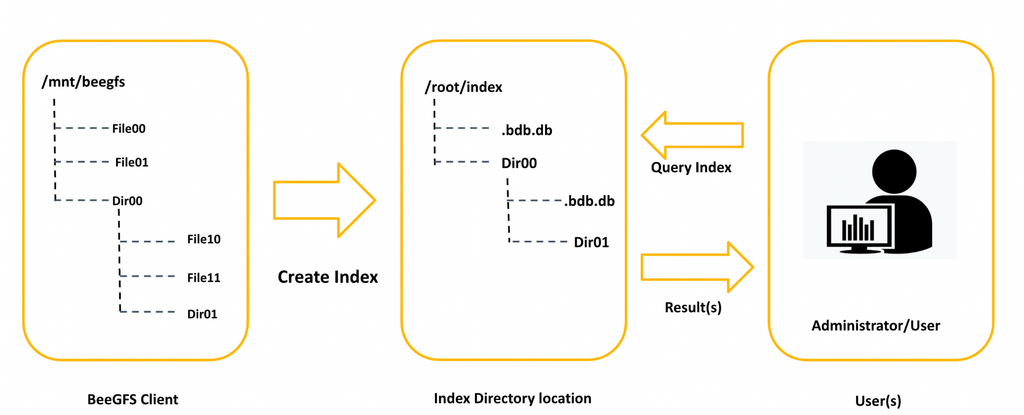
Description
BeeGFS Hive Index enables users to efficiently search through billions of files and directories while minimizing the impact on filesystem performance. Its multithreaded design allows parallel scanning of multiple directories, ensuring fast and efficient metadata extraction. The index supports POSIX user permissions, directory tree attributes, and hierarchical representation.
By default, BeeGFS Hive Index extracts BeeGFS-specific metadata for regular files using BeeGFS ioctls. However, these additional ioctls can increase the filesystem load during index creation. To mitigate this, users have the option to disable BeeGFS-specific metadata extraction.
Only the root user can create the index, as the process requires scanning the entire directory hierarchy, which may include files and directories owned by different users. Therefore, it is recommended that an administrator perform the index creation. Maintaining a single index directory per BeeGFS filesystem helps ensure consistency with ongoing filesystem changes.
Since the index preserves user permissions, it can be shared among users and administrators. Even with a shared index, users can query only their own data, ensuring access control.
BeeGFS Hive Index supports two indexing methods:
In-Tree Index Stored within the BeeGFS filesystem.
Out-Tree Index Stored at a different location, such as another local filesystem.
Warning
Creating an index or rescanning directories to update the index should not run in parallel across multiple instances, as this can cause database corruption or an inconsistent index state.
In-Tree index
In the In-Tree Index method, the index is created directly inside the BeeGFS filesystem. Each subdirectory will contain a separate .bdm.db database file, which holds metadata specific to that subdirectory. The database stores detailed metadata information about the files within the directory, such as filenames, timestamps, file size, extended attributes, and more.
However, creating the index inside BeeGFS can potentially interfere with ongoing filesystem operations, especially during high-traffic periods. To minimize the impact, it is recommended to schedule metadata scanning during periods of low filesystem activity if the index needs to reside within the BeeGFS filesystem.
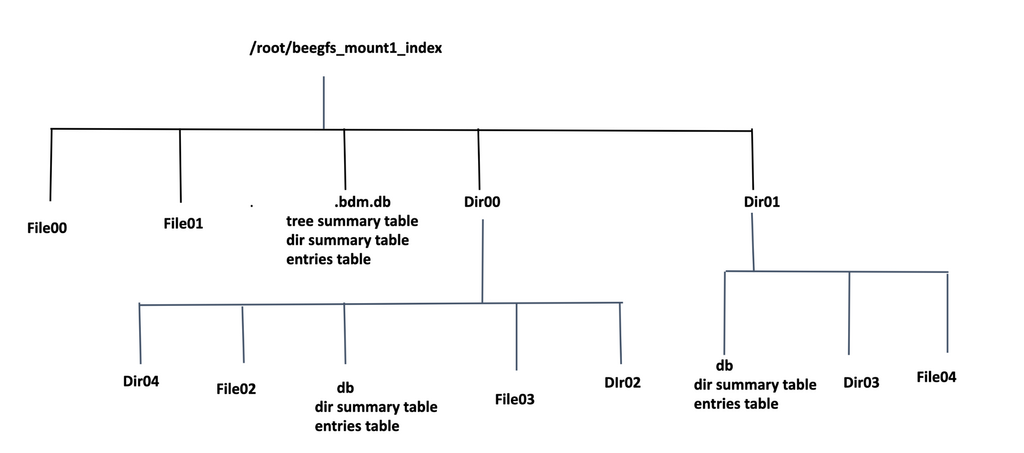
Out-Of-Tree Index
The Out-Of-Tree Index method allows users to create the BeeGFS filesystem index at an external location, such as a local filesystem or an NFS share.
During the index creation process, a directory hierarchy is generated at the chosen index location, mirroring the structure of the source directory. Each directory in the index stores metadata information about its files and subdirectories. The index hierarchy preserves the user permissions of the source directory, enabling faster metadata queries while maintaining access control.
In BeeGFS, metadata can be distributed across multiple metadata nodes. With the Out-Of-Tree Index, metadata is stored locally, making queries significantly faster without affecting critical filesystem operations.
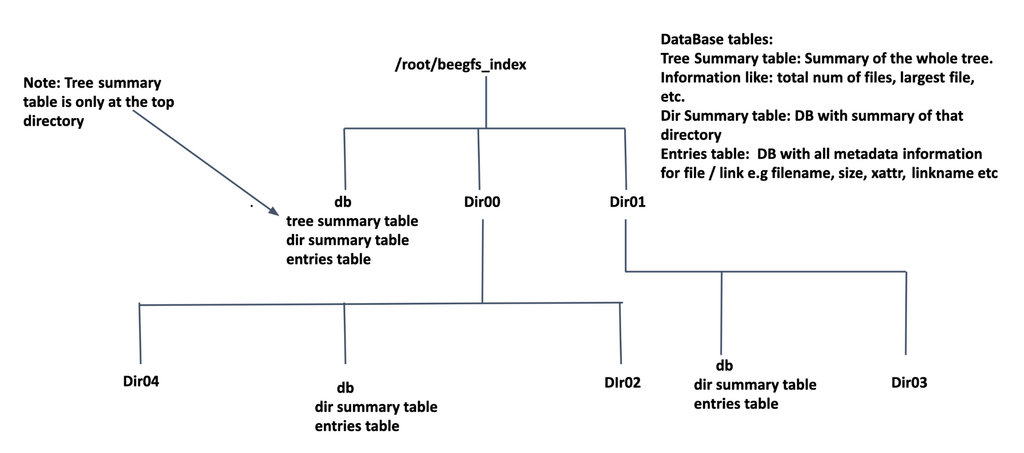
In-Tree vs Out-Of-Tree Index
In-Tree Index:
Pros: No additional storage needed as index database files are stored inside the BeeGFS file system itself.
Cons: Indexing operations may impact filesystem performance, especially during high traffic periods.
Out-Tree Index:
Pros: As index databases are stored outside the file system, running queries on the indexed data will not affect the on-going important file system operations.
Cons: Requires dedicated storage space to store the indexed metadata of the file system.
BeeGFS Hive Index Database
BeeGFS Hive Index database (.bdm.db stored inside each subdirectory) holds three types of records as listed below:
- Entries Table: Stores detailed metadata information about files and
links (filename, size, blks, mtime, ctime, atime, extended attributes, also BeeGFS specific metadata like stripe pattern, storage targets, metadata owner ID, the file’s entryID, the parent’s entryID, etc).
- Directory Summary Table: Stores information like total files inside
the directory, total subdirectories inside the directory, total size of the directory (sum of all file’s sizes inside the directory) , etc.
- Tree Summary Table (optional): Stores a summary of the complete
directory hierarchy. This information is present only at the top level directory. The table contains information like total files in the directory tree, total subdirectories, maxfilesize, minfilesize.
Step-By-Step Guide for BeeGFS Hive Index
Prerequisites
The following packages need to be installed on the node that runs BeeGFS Hive Index:
libpcre3
coreutils
SQLite
python3
python3-distutils
Installation
Visit the BeeGFS download page and follow the
step-by-step directions to add the BeeGFS package repositories to your Linux distribution’s
package manager.
Using your distribution’s package manage install the beegfs-hive-index package.
Initial configuration
BeeGFS Hive Index commands use a configuration file which must be present at
/etc/beegfs/index/config
A sample configuration file will be installed during the package
installation at /etc/beegfs/index/config.example which can be modified
and renamed to /etc/beegfs/index/config
Following are the important parameters from the config file:
# Number of threads for running index operations
Threads=10
Number of threads to run the Hive Index commands. You should set this count as per the number of cores available on the system where the Hive Index will be created.
# absolute path to bee executables
# single path string
Executable=/opt/beegfs
The absolute path where the BeeGFS Hive Index binaries are installed. Default
path is /opt/beegfs.
# Source directory path:Index directory path
IndexPaths=/mnt/beegfs:/mnt/index
Colon separated path to BeeGFS Filesystem directory for which index will be
created and absolute path for the index directory. (<mount-point>:<index-directory-path>), for example IndexPaths=/mnt/beegfs:/work/index.
These two paths allow Hive Index commands to run without explicitly specifying absolute paths for source directory or Index directory.
If you want to create the index inside the file system directory itself, only
specify the source directory path in IndexPaths, for example
IndexPaths=/mnt/beegfs.
# Filesystem mount point path
MountPath=/mnt/beegfs
BeeGFS mount point.
BeeGFS Hive Index Utilities
All BeeGFS Hive Index operations can be performed through a bee.
Operations like creating an index, rescanning the index, listing the files from the
index and finding files from the index are the subcommands to bee index.
BeeGFS Hive Index Creation
You can create an index using In-Tree (Inside Filesystem) or Out-Of-Tree(Outside Filesystem) options as per the requirements.
For creating the index use the subcommand bee index.
In-Tree Indexing (Inside the Filesystem)
If you want to store the index inside the BeeGFS filesystem itself, specify the same path for both the source directory and the index directory:
/etc/beegfs/index/config
IndexPaths=/mnt/beegfs:/mnt/beegfs
Out-Of-Tree Indexing (Outside the Filesystem)
If you want to store the index outside the BeeGFS filesystem, specify a different path outside filesystem for the index directory
/etc/beegfs/index/config
IndexPaths=/mnt/beegfs:/mnt/index
See bee index –help for all available options.
Warning
Do not run multiple create index instances for the same filesystem in parallel to prevent data inconsistency or database corruption.
Creating an In-Tree index
With the appropriate IndexPaths already set in /etc/beegfs/index/config simply run:
$ bee index
Instead of using a config file you could also directly specify the path where the in-tree Index should be created and the path where BeeGFS is is mounted. You can also control the number of threads used for scanning and impose a maximum limit on memory used by the scanner:
$ bee index -F /mnt/beegfs -I /mnt/beegfs -M /mnt/beegfs -n 4 -X 8G -s
Creating an Out-Of-Tree Index
If the config file has both file system source directory path and index
path mentioned, bee index command will pick up the paths from
config file.
$ bee index -F /mnt/beegfs -I /work/index -M /mnt/beegfs -B
create out-tree index with tree summary table and memory limit 8G and #4 threads and do not extract the BeeGFS specific metadata.
$ bee index -F /mnt/beegfs -I /work/index -M /mnt/beegfs -X 8GB -n 4 -s -B
beegfs index rescan
The index can be updated manually using the rescan functionality, which refreshes the metadata for a specific subdirectory in a previously indexed filesystem.
If users know which directories have changed over time, they can rescan only those specific directories to update the index. Alternatively, a periodic rescan of the entire directory tree can be scheduled to keep the index up to date. Running rescans during low-traffic periods is recommended to minimize the impact on important filesystem operations.
The rescan command ensures that: - Newly created files and directories are added to the index. - Deleted files and directories are removed from the index.
Modes of Rescan:
Rescan (Non-recursive)
Updates metadata for the specified subdirectory.
Indexes newly created files within the subdirectory.
Detects and indexes newly created immediate child subdirectories.
Deletes stale immediate child subdirectories from the index.
Does not update existing child subdirectories that were already indexed.
- Rescan with recursion
Recursively updates the index for the entire subdirectory tree.
Updates metadata for all files and subdirectories, including existing indexed subdirectories.
Detects and indexes newly created files and directories at all levels.
Removes stale directories and files from the index.
subdirectory of the filesystem can be rescanned using:
See bee index –help for all available options.
$ bee index -r /mnt/beegfs/sub-dir1/
To rescan a subdirectory recursively:
$ bee index -R /mnt/beegfs/sub-dir1/
Warning
Avoid running multiple rescan instances for the subdirectories in parallel to prevent data inconsistency or database corruption.
beegfs index stats
The stats subcommand allows users to obtain file system statistics such as the total number of files, directories or links.
like the total number of files, directories or links in the directory hierarchy, files, directories, or links per level, maximum and minimum file sizes..
Note
bee stats should be run from Index directory or the Filesystem directory. We can also provide an absolute path of directory.
See bee stats –help for all available options.
$ bee stats filecount /work/index/arch/alpha

$ bee stats -c total-filecount /mnt/beegfs
Some of the important options are:
1. total-filecount: Get the total number of files under a directory. It reports the count per uid. But with –cumulative shows cumulative numbers rather than per uid.
2. total-linkcount: Similar to total-filecount, gets the total number of links under a directory.
$ bee stats -c total-filecount /mnt/beegfs
6

$ bee stats total-linkcount /mnt/beegfs/test2
root 1
3. dirs-per-level/files-per-level/links-per-level: Get the count of <type>s in each directory level per uid.
$ bee stats files-per-level /mnt/beegfs
root 0 14
root 1 801
root 2 11182
root 3 17738

$ bee stats dirs-per-level /mnt/beegfs
root 0 1
root 1 19
root 2 468
root 3 1104
For other options please check the beegfs stats --help
beegfs index find
The find subcommand can be used to find the files in an index directory hierarchy.
find has very similar options to GNU find and allows users to get results
by running queries over the index directory.
If BeeGFS specific metadata is extracted during create index, that metadata
can also be queried using find command.
Hive’s find is way faster than running actual find commands over the file system.
Following are some of the options from bee find --help
See bee find –help for all available options.
Following are some of the examples for bee find:
To get the list of files which are greater than 1GB in size
$ bee find /mnt/beegfs --size +1G
/mnt/beegfs/dataset0/user1/test1.txt
/mnt/beegfs/dataset0/application.txt
/mnt/beegfs/dataset0/user2/test.txt
To get the list of files which are created within 24 hours.
$ bee find /mnt/beegfs --ctime=-1
/mnt/beegfs/dataset0/file.txt
To get the list of files which are not accessed from the last 10 days.
$ bee find /mnt/beegfs --atime -10
/mnt/beegfs/dataset2/file1.txt
Some important options to query BeeGFS specific metadata
Reverse map the entryID to filename:
$ bee find /mnt/beegfs --entryid "0-660D2950-1"
/mnt/beegfs/linux.tar.gz
List files whose data is stored on given storage target:
$ bee find /mnt/beegfs --targetid "101"
/mnt/beegfs/newfile
/mnt/beegfs/file3.txt
/mnt/beegfs/linux.tar.gz
List files whose metadata is stored on a give metadata node:
$ bee find /mnt/beegfs --ownerid "1"
/mnt/beegfs/dataset0/stg1/test1.txt
/mnt/beegfs/dataset0/stg1/test2.txt
/mnt/beegfs/dataset0/nmv/data1
beegfs index ls
bee ls lists the index directory contents. It has similar options as standard ls commands.
bee ls can work with absolute paths and relative paths both. Run from index directory or file system directory
By adding the --beegfs flag, users can print BeeGFS specific metadata for a file.
if running with relative paths.
Displays the contents of the index directory.
This command works similarly to the standard “ls” command, supporting both absolute and relative paths. You can use it from within the index directory or from a filesystem directory when specifying relative paths.
See bee ls –help for all available options.
Example: List the contents of the index directory at /mnt/index. $ bee ls /mnt/index
To print the inode number of the files in a directory:
$bee ls -i user/data/
3224807882485797791 core.c
9553679804207926350 kfence.h
10232643267511233810 kfence_test.c
16487850910921490669 Makefile
348824457185005735 report.c
To sort the files in a directory in descending order and print the size:
$ bee ls arch/alpha/boot/ -Ss
27 bootpz.c
13 stdio.c
12 bootp.c
9 misc.c
To list the files in a directory with sizes in human readable format:
$ bee ls -hls
1 -rw-rw-r-- 1 root root 496.0 Feb 11 08:26 COPYING
198 -rw-rw-r-- 1 root root 98.6K Feb 11 08:26 CREDITS
1 drwxrwxr-x 4 root root 144.0 Feb 11 08:26 data
1 drwxrwxr-x 81 root root 97.0 Feb 11 08:26 Documentation
List the files with BeeGFS specific metadata
-b or –beegfs: List the BeeGFS specific metadata for the regular files. It prints EntryID, ParentID, Metadata OwnerID, Chunk Size and Number of targets respectively.
$ bee ls -b

4-66854319-2 0-668542DD-2 1 524288 5 analytics
1-66854319-2 0-668542DD-2 1 524288 2 edge_solution.txt
2-66854319-2 0-668542DD-2 1 524288 4 data.log
beegfs index stat
bee stat displays file and directory metadata information. It has similar options as GNU stat.
With a special --beegfs option, user can print BeeGFS specific metadata for a file.
bee stat can be run with the absolute path of the file system or index directory from anywhere.
To use relative paths, bee stat commands should be run from inside a file system source directory or index
directory.
$ bee stat file.txt

File: '/dataset/index/file.txt'
Size: 727 Blocks: 2 IO Block: 524288 regular file
Device: h/ d Inode: 8523084679231612220 Links: 1
Access: (0664/-rw-rw-r--) Uid: ( 0/ root) Gid: ( 0/ root)
Context:
Access: 2023-01-03 09:09:48 +0100
Modify: 2022-02-11 09:26:32 +0100
Change: 2023-01-03 09:09:48 +0100
Birth:
To include BeeGFS specific metadata, add the ``–beegfs`` flag.
$ bee stat --beegfs system.log
path: system.log
Entry type: file
EntryID: 0-66854319-2
ParentID: 0-668542DD-2
Metadata Owner ID: 2
Stripe pattern details:
+ Type: RAID0
+ Chunksize: 524288
+ Number of storage targets: 4
 + Target ID 501
 + Target ID 601
 + Target ID 701
 + Target ID 801
beegfs index query
bee query-index subcommand allows users to execute SQL queries directly over the index database.
This command can be useful if users want to get specific metadata information which is not accessible using the Hive Index commands.
See bee query-index –help for all available options.
List the database entries for files inside net directory
$ bee query-index -I . -s "select * from entries"
|id|name|type|inode|mode|nlink|uid|gid|size|blksize|blocks|atime|mtime|ctime|linkname|xattrs|crtime|
ossint1|ossint2|ossint3|ossint4|osstext1|osstext2|pinode|ownerID|entryID|parentID|entryType|featureFlag|
stripe_pattern_type|chunk_size|num_targets|target_info|

1|devres|f|11002537685141370162|33188|1|0|0|25560551|524288|49923|1720521953|1720521953|1720521953|||0|0|0|0|0|||
140174793085336|1|7D8-668D14D1-2|0-668D1457-1|2|3|1|524288|2|1:2:|
2|README|f|16374403434744466135|33188|1|0|0|21258827|524288|41522|1720521953|1720521953|1720521953|||0|0|0|0|0|||
140174793085336|1|7D9-668D14D1-2|0-668D1457-1|2|3|1|524288|2|1:2:|
3|spec|f|17175560844328665268|33188|1|0|0|23669|524288|47|1720521954|1720521954|1720521954|||0|0|0|0|0|||
140174793085336|1|90E-668D14D1-2|0-668D1457-1|2|3|1|524288|2|2:1:|
Get the summary information for net directory
$ bee query-index -I net/ -s "select * from summary"
|id|name|type|inode|mode|nlink|uid|gid|size|blksize|blocks|atime|mtime|ctime|linkname|xattrs|totfiles|totlinks|minuid|maxuid|
|mingid|maxgid|minsize|maxsize|totltk|totmtk|totltm|totmtm|totmtg|totmtt|totsize|minctime|maxctime|minmtime|maxmtime|minatime|
|maxatime|minblocks|maxblocks|totxattr|depth|mincrtime|maxcrtime|minossint1|maxossint1|totossint1|minossint2|maxossint2|
|totossint2|minossint3|maxossint3|totossint3|minossint4|maxossint4|totossint4|rectype|pinode|

|1|net|d|5920216113766933286|16893|72|0|0|76|524288|1|1672733464|1644567992|1672733467|||6|0|0|0|0|0|2250|89444|0|6|6|0|0|0|126954|1672733464|1672733467|
|1644567992|1644567992|1672733464|167273|3467|5|175|0|0|0|0|0|0|0|0|0|0|0|0|0|0|0|0|0|10872060183036577154|
Limitations and Known Issues
Currently, BeeGFS Hive Index supports only manual index creation and rescan of subdirectory or while directory tree on previously created index. It does not automatically keep the index in sync with ongoing filesystem operations. To update the index users needs to manually scan the filesystem to update the index with the latest information.